
Affiliate Disclosure: This article contains an affiliate link. If you buy through the link, I may earn a commission at no extra cost to you.
Quick Verdict
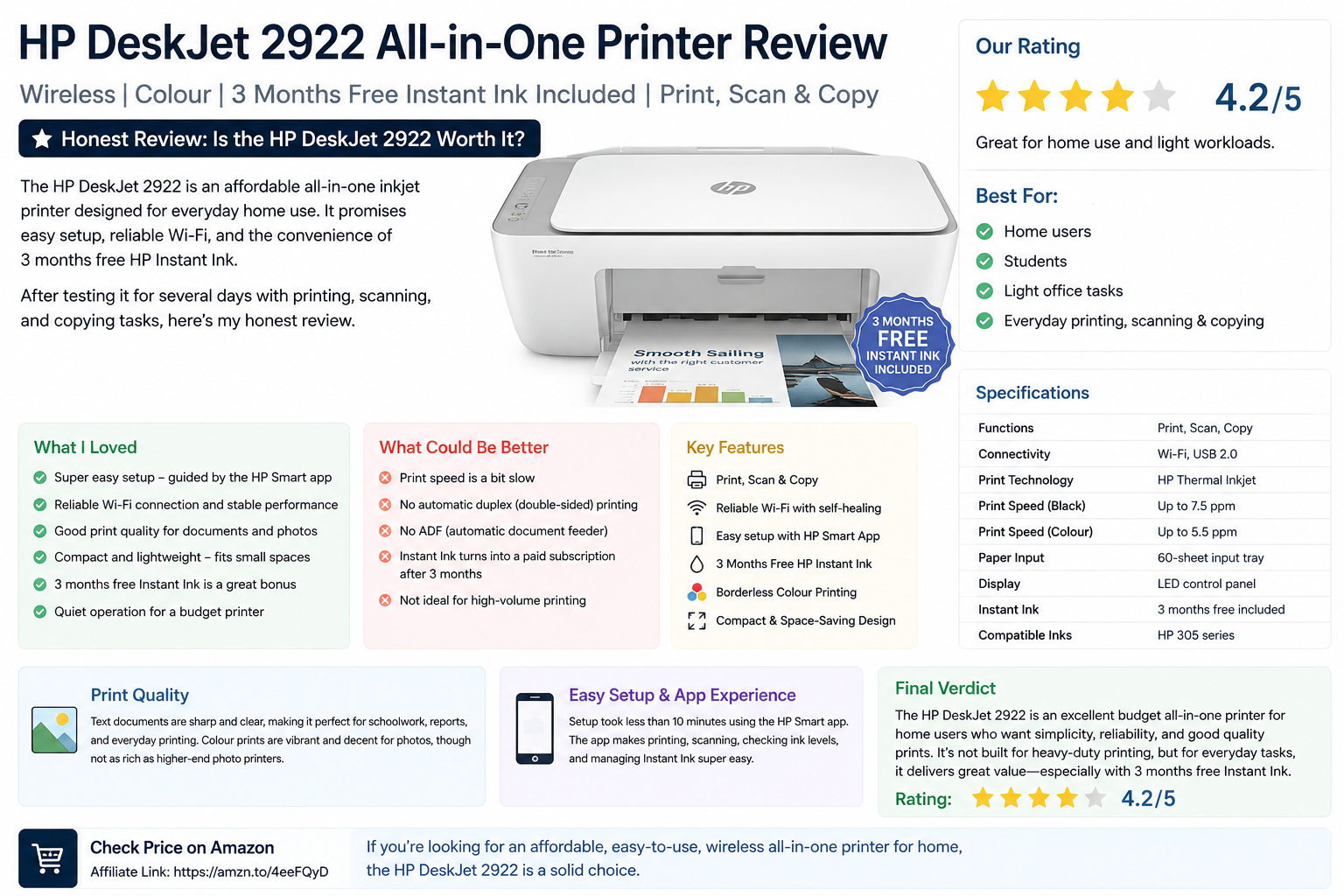
The HP DeskJet 2922 All-in-One Printer is a budget-friendly wireless colour inkjet printer made for simple home printing, scanning, and copying. It is best for light everyday use, such as printing homework, return labels, documents, forms, simple colour pages, and occasional photos.
It is not a heavy-duty office printer. HP recommends a monthly page volume of 50 to 100 pages, and the print speed is up to 7.5 ppm in black and 5.5 ppm in colour, so it is clearly designed for casual home use rather than high-volume printing.
My honest rating: 4.1/5
Best for: Home users, students, families, light printing, scanning, and copying
Not ideal for: Heavy printing, fast office work, automatic double-sided printing, or bulk scanning
What Is the HP DeskJet 2922?
The HP DeskJet 2922 is an all-in-one printer that can print, scan, and copy. It supports wireless printing, USB connection, mobile printing through the HP app, Apple AirPrint, Mopria Print Service, and Android HP Print Service Plugin.
It also includes 3 months of HP Instant Ink with the listed Amazon/Currys-style bundle, which can be useful if you want to reduce the hassle of buying ink straight away. Currys Business lists this model with 3 months free Instant Ink, Wi-Fi, Apple AirPrint, up to 7.5 prints per minute, and a 60-sheet paper tray.
What I Like About It
The biggest advantage is simplicity. This printer is made for people who want an affordable all-in-one printer without complicated setup. HP highlights easy setup through its app, self-healing dual-band Wi-Fi, and the ability to print, scan, and copy from devices.
It is also compact. The Amazon listing gives dimensions of 30.4 cm deep x 42.5 cm wide x 15.4 cm high, which makes it suitable for a desk, shelf, bedroom, home office, or student room.
The print quality should be fine for everyday documents, schoolwork, forms, labels, and basic colour pages. HP lists best black print quality at up to 1200 x 1200 rendered dpi and colour quality up to 4800 x 1200 optimized dpi when using selected HP photo papers from a computer.
What Could Be Better
The print speed is modest. At up to 7.5 ppm black and 5.5 ppm colour, this is not the right printer if you regularly print long documents or need fast office output.
It also has basic paper handling. Currys Business lists a 60-sheet paper tray, and the printer is better suited to occasional printing than large jobs.
Another thing to watch is ink cost. The 3-month Instant Ink trial is useful, but once the trial ends, you will either need to pay for an Instant Ink plan or buy cartridges separately. That is normal for budget inkjet printers, but it is worth checking before buying.
Pros and Cons
Pros:
Easy wireless setup, print/scan/copy in one machine, compact size, mobile printing support, Apple AirPrint support, good for home and student use, includes 3 months Instant Ink on this bundle.
Cons:
Slow compared with office printers, not ideal for high-volume printing, small paper tray, ongoing ink costs matter, basic features compared with more expensive HP ENVY or OfficeJet models.
Who Should Buy It?
The HP DeskJet 2922 is a good choice if you need a simple and affordable printer for occasional home use. It is ideal for printing homework, shipping labels, return forms, recipes, simple documents, and light colour pages.
It is not the best choice if you print every day, run a business from home, need fast printing, need automatic duplex printing, or scan lots of pages at once.
Final Verdict
The HP DeskJet 2922 All-in-One Printer is a solid budget printer for light home use. It does exactly what most casual users need: wireless printing, colour printing, scanning, and copying in a compact body.
The main thing to understand is that this is a low-cost home printer, not a professional office printer. If your expectations are realistic, it offers good value.
Final Rating: 4.1/5
Best use: Light home printing, scanning, copying, schoolwork, labels, and everyday documents.
Biggest warning: Check Instant Ink pricing and cartridge costs before the free trial ends.